Enjoy 10% OFF your next purchase with "SAVE10"
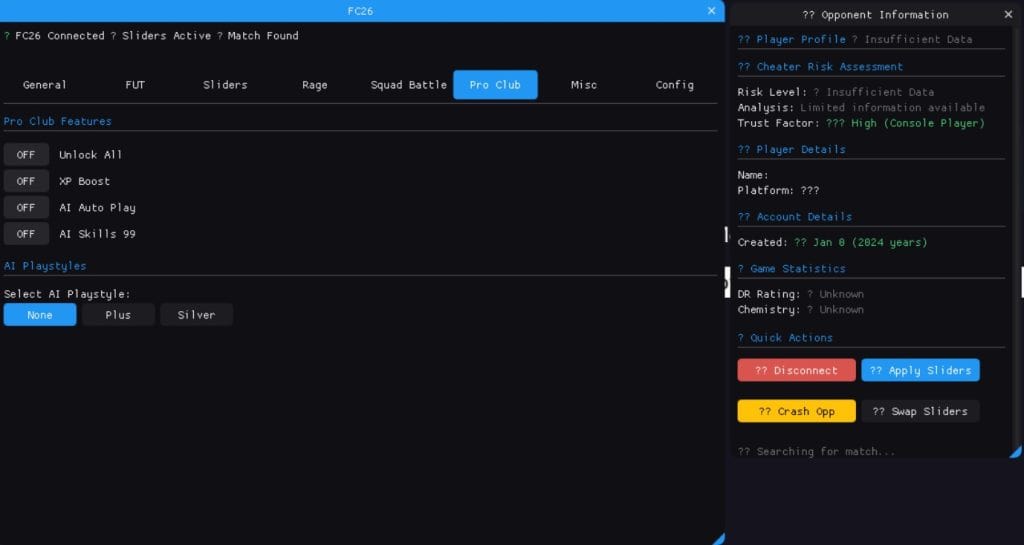
Pro Clubs in EA SPORTS FC 26 gives you the classic experience: create a Virtual Pro, join friends, and climb divisions together. The problem is that progress can feel very slow. Unlocking PlayStyles, improving stats, and upgrading club facilities can take dozens of hours if you only play a few matches per week.
Cheatservice tools are built to speed up that journey. Features like XP Boost, AI Auto Play, Free Facilities, and Unlock All PlayStyles help you raise your Virtual Pro and your club without spending an entire season grinding low-division games. This guide explains how those features work, how to use them responsibly, and how they fit into the current Pro Clubs meta.
By default, you level up your Virtual Pro through match XP. Goals, assists, tackles, clean sheets, and match ratings all feed into your growth. As you level, you unlock attribute points and PlayStyles that change how your player feels on the pitch. Clubs themselves unlock facilities over time, improving training, stadium atmosphere, and more.
For a casual player, this process can be enjoyable but painfully slow. Joining late in the year is even harder: you face veterans with fully upgraded builds while your new Pro still feels like a bronze card. That is where XP and facility shortcuts become extremely valuable.
XP Boost directly increases the experience you gain per match, letting you reach higher levels with fewer games played. Combined with AI Auto Play, you get an automated way to grind out matches when you are busy with real life.
For a more natural curve:
This pattern still saves you a lot of time while keeping your progression believable for teammates and opponents.
AI Auto Play hands control of your Pro to the AI during Pro Clubs matches. This is useful when you want XP but cannot actively focus on every game. It is best used in lower-stakes matches where your club understands what you are doing.
To avoid awkward situations, talk with your teammates first. Use AI Auto Play during quiet farming sessions, not during serious promotion or playoff matches where human reactions and coordination matter the most.
Normally, clubs unlock facilities over time by playing matches, winning, and meeting specific milestones. These upgrades affect the club environment: training grounds, stadium atmosphere, and other cosmetic or subtle performance details.
The Free Facilities feature skips that waiting period and upgrades everything instantly. The main benefit is simple: your club looks and feels like an established, top-tier team from day one.
Good moments to unlock everything include:
Just remember that these changes are mostly visible and atmospheric. They do not replace the need for real chemistry, communication, and tactical coordination.
The Pro Clubs meta in FC 26, just like in previous years, revolves around the right PlayStyles and stat distribution. Strikers rely on finishing and explosive pace, midfield engines focus on stamina and passing, while defenders need strength, positioning, and aerial reach.
Unlock All PlayStyles, 99 Hidden Stats, and 5-Star Skills / Weak Foot give your Pro a huge advantage. Instead of waiting weeks to experiment with different builds, you can instantly test meta combinations across positions.
With the Internal and Meta tools, you can:
The key is moderation. Do not create an unrealistic giant with sprinter speed and perfect agility if you want your gameplay to look believable. Stick to archetypes that feel strong but not cartoonish.
Even in Pro Clubs, your activity still passes through EA’s anti-cheat and server logs. That means you should respect a few safety basics:
Playing strong but imperfect football is far more believable than steamrolling every lobby without ever making a mistake.
Pro Clubs in EA SPORTS FC 26 can be one of the most rewarding modes in the game, but slow progression can push casual players away. Features like XP Boost, AI Auto Play, Free Facilities, and Unlock All PlayStyles give you a way to catch up with long-time grinders and enjoy the mode at its best without sacrificing months of your free time.
If you want to combine these Pro Clubs tools with FUT-focused features like Auto-Win and Division Spoofer, start with our main EA FC 26 hacks page and explore the dedicated Meta and Internal products. Build your dream club now, then spend your sessions enjoying football instead of fighting the grind.
Share it on:
