Enjoy 10% OFF your next purchase with "SAVE10"
About the Author: The CheatService engineering team has provided Rust cheats since 2021, surviving 50+ forced wipes, every EAC database refresh, and the introduction of Cerberus anti-cheat. Our kernel-level drivers are tested by thousands of active users with a 4.5/5 Trustpilot rating. We've maintained undetected status through every Facepunch update for over 5 years. Last reviewed: May 27, 2026.
Rust is the most punishing survival game on Steam. One bad fight and you lose your entire inventory — weapons, armor, sulfur, components — everything you spent hours gathering. The Naval Update (February 2026) added ocean combat, Modular Boats, and the Floating City, introducing entirely new engagement ranges and movement patterns. Standard aim settings that worked on land fail against ship-to-ship combat where both you and your target are bobbing on waves. This guide covers the exact Legit config our most successful users run to dominate every wipe, from launch day to end-of-month raid night, without triggering EAC or Cerberus detection.
⚡ TL;DR — Best Settings at a Glance
Rust has the most complex weapon handling of any survival game. Every gun has a unique recoil pattern that must be memorized. The AK-47 kicks up and right in a specific pattern. The LR-300 has a tighter but faster pattern. The MP5 sprays in a wide cone. Add bullet drop, projectile travel time, and target movement prediction — and you have a aiming challenge that no other FPS matches.
Our Recoil Control System (RCS) handles all of this automatically. Configured correctly, it compensates for recoil patterns while still showing natural weapon movement in spectator view — the key difference between accounts that survive wipes and accounts that get reported.
| Setting | Recommended | Why |
|---|---|---|
| FOV | 5° | Wide enough for spray transfers, tight enough to look natural |
| Smooth Aim | 5-6 | Mimics 2K-hour player tracking speed |
| Target Bone | Head | Rust's headshot multiplier is 2x — always prioritize headshots |
| RCS | Full (AK/LR/MP5) | Compensate every weapon's unique pattern |
| Vis-Check | On | Critical — never shoot through bases or terrain |
| Silent Aim | On | Bullets connect without camera movement |
The Naval Update introduced combat where both you and your target are moving on independent physics objects (boats bobbing on waves). Standard aim settings fail because the target's vertical position oscillates unpredictably.
| Setting | Naval Value | Why |
|---|---|---|
| FOV | 8° | Wider to track bobbing targets across waves |
| Smooth Aim | 4 | Faster tracking for wave oscillation |
| Bone | Chest | Boats bob — chest is more consistent than head |
| Lead Prediction | On | Both shooter and target are moving on water |
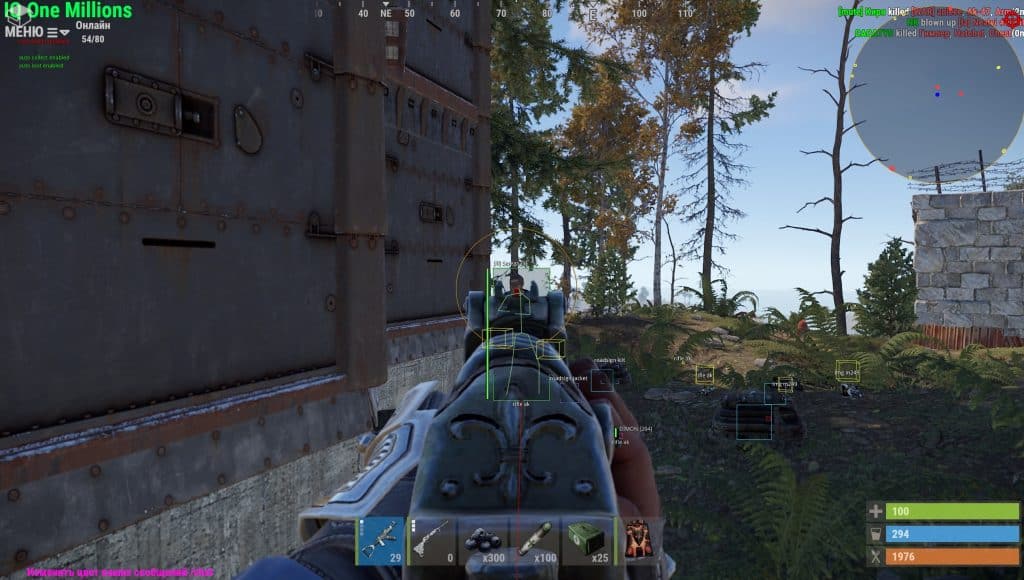
Rust ESP needs to balance information density with screen clarity. Too many overlays and you can't see what's happening in a compound fight. Too few and you miss the roof camper.
| ESP Type | Recommended | Why |
|---|---|---|
| Skeleton ESP | On (500m) | See stances through terrain and bases |
| Loot ESP | Custom filter | Show weapons, sulfur, components, airdrops only |
| Distance ESP | On | Know engagement range before committing |
| Health Bar | On | Push wounded enemies, avoid full-health roamers |
| Team Check | On | Instant ID in compound fights — no friendly fire |
| Debug Camera | On (bind: F6) | Scout bases and monuments without exposing position |
Our cloud system detects version mismatches within minutes of a new forced wipe going live. The loader will not allow you to launch until new offsets are verified — this protects your account from launching on a detected version. Loader updates push within 2-6 hours of every wipe. Historically, our EAC bypass has recovered within 4 hours of every forced wipe since 2021.
The Debug Camera is a free-camera mode that lets you scout bases, monuments, and offshore targets from any angle without moving your character. Your player stays in place while the camera flies up to 500m in any direction. Use it to check if a base has active defenders before raiding, scout counter-raiders approaching, or find hidden loot rooms. Bind it to F6 for quick toggling.
Yes. Silent Aim adjusts bullet trajectory to hit the target without moving your crosshair. When a roof camper peeks, you can fire from any angle and the bullets will connect. From their killcam perspective, you appeared to be aiming at the wall and somehow hit them — which looks like desync, not cheating. Roof campers are the #1 use case for Silent Aim in Rust.
Cerberus is Facepunch's proprietary server-side anti-cheat that runs alongside EAC. It analyzes player statistics — headshot percentage, accuracy, resources gathered per hour — and flags accounts with anomalous patterns. EAC catches the cheat process; Cerberus catches the behavior. Our Legit settings (chest targeting, Smooth 5+, Vis-Check) produce statistics that pass Cerberus analysis without triggering flags.
Enable Weapon ESP (Tier 2+ only — ignore primitive weapons), Sulfur/Ore ESP (for raiding resources), Component ESP (pipes, springs, gears, rifle bodies), and Airdrop ESP (always show Locked Crate and Chinook crate locations). Disable food, cloth, wood, and stone ESP — these are everywhere and clutter your screen. You can customize every filter in the ESP menu.
Rust rewards preparation over raw aim. The right settings for the right situation — land combat, naval combat, raiding, roaming — make the difference between ending the wipe with a box of AKs or losing everything to a roof camper on day one. Our profiles handle all of it automatically. Visit our Rust settings guide to get these configs pre-loaded and start dominating every wipe.
Share it on:
