🎉
Enjoy 10% OFF your next purchase with "SAVE10"
Home
Games
Hacks
Status
How It Works
Support
Blog
Sign In
How to use Lagswitch
To properly run the hack, follow the instructions and steps.
Note
Install VC c++ components if your PC doesn’t already have them.
Download Here
Step 1
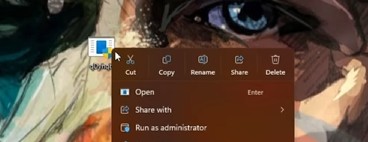
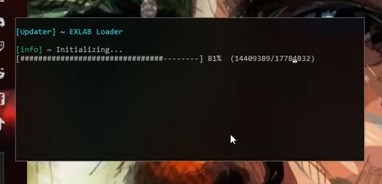
Run the loader as administrator, and wait until it finish initializing.
Step 2
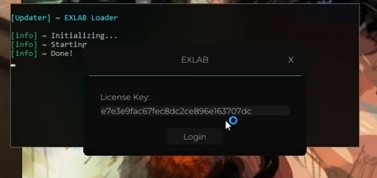
Paste your key when the EXLAB Tab pops up then press login.
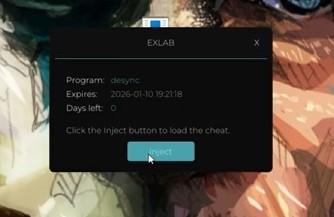
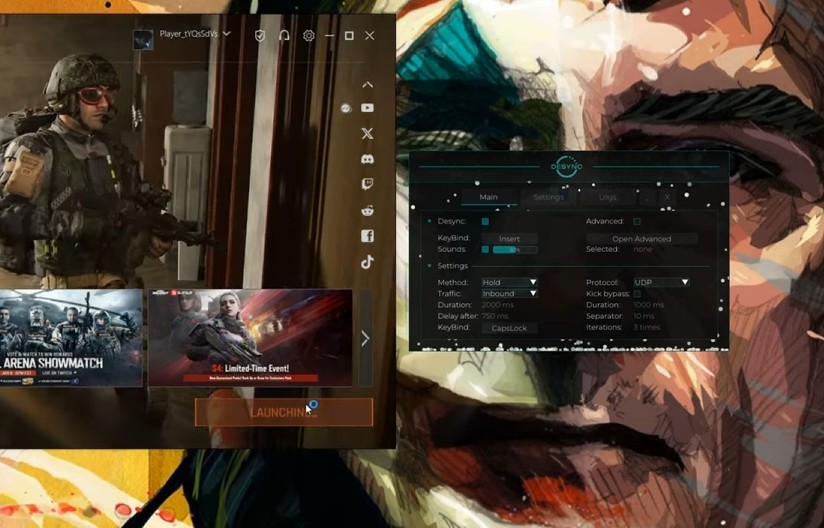
A new window should open, Press Inject.
Step 3
When the menu show up , Launch the game.
TIPS
Protocol:
All modern games use UDP protocol, do not change it if you do not know what it is.
Traffic settings [Main]:
1. Desync: on
2. Method: Any, rec. Temporary. Desync activation methods:
Temporary: press - turn on for a while and off;
Pressing: pressed - on / pressed - off;
Hold: press - on / release - off;
3. Traffic: Inbound / Outbound
4. Protocol: UDP / (TCP - not usually for games)
5. Delay after: rec. 750 (delay after desync action)
Escape From Tarkov:
[Kick bypass] - On
Lag duration: 1000 ms
Separator: 5 - 15 ms
Iterations: 1 - 6 times
Duration after: 750 ms
Method:
Temporary
Traffic:
Inbound
ABI - Arena Breakout Infinite:
[Kick bypass] - Off
Not needed
Method:
Recommended: Hold
Traffic:
Outbound
Duration:
Recommended: 1500 - 2000 ms
PUBG - BATTLEGROUNDS:
[Kick bypass] - Off
Not needed
Method:
Temporary
Traffic:
Inbound
Duration:
Recommended: 1600 - 1750 ms
DayZ:
[Kick bypass] - Off
Not needed
Method:
Recommended: Temporary
Traffic:
Outbound / Inbound
Duration:
Recommended: 3000 - 6000 ms
Faceit CS2:
[Kick bypass] - Off
Not needed
Method:
Recommended: Hold
Traffic:
Outbound
Duration:
Recommended: 1500 ms